úterý 7. července 2015

Additional tips for 3DSimo Mini

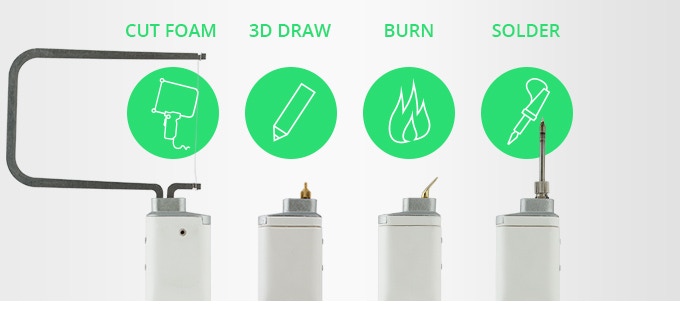
3DSimo launched new campaign on kickstarter to support their new 3DSimo Mini 3D pen. There are similar products on the market, like second version of 3Doodler. I decided to support this project for one reason - exchangeable tips.

I am 3D print fan and I have a printer myself. With this 3D draw tip I can simply join prints together and create complex objects.

I have few suggestion for 3DSimo team to make this product even more versatile.

Filament joiner

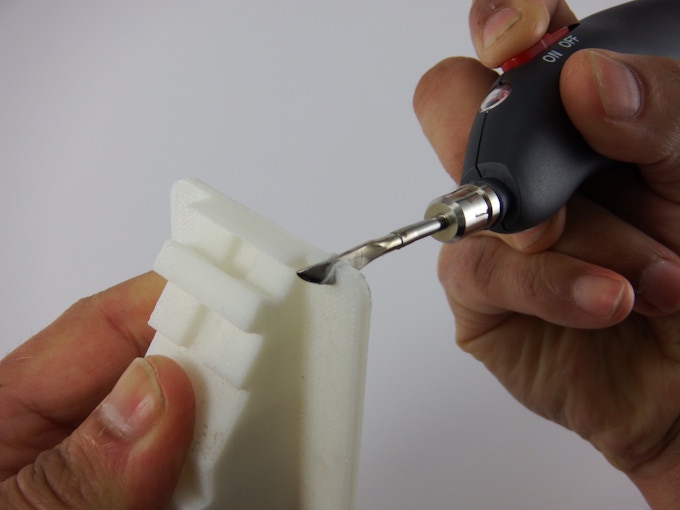
This tip will enable you to weld and splice filament pieces together. Then you could create multi-color filament to create such prints.

There are already several products on the market, but additional tip for 3Dsimo would be elegant solution.

Products on the market:


Print finishing tool

3D printed object is usually not final and it requires additional work. You need to remove print supports or print residues, make print smoother or fix issues caused by wrong print settings.

There are already dedicated tools for finishing print like Retouch3d or Cordless.  But why not to have all in one? I can imagine multiple heads for this task.

Cordless tool tips:


Retouch3D tool tips:


How this tools can improve a print

Retouch3D tool in action

Blank tip for custom tools 

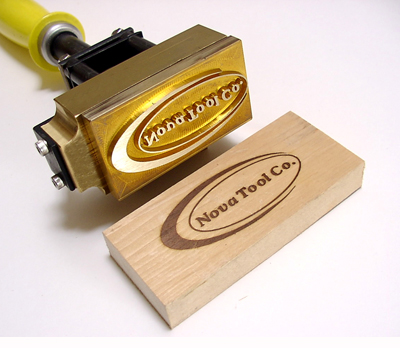
Imagine I would like to create a custom tool, e.g. wood branding iron with my logo. Blank tip would help me with it a lot. I could just cast the logo in metal and append it on such blank head. Simple and easy :o)


čtvrtek 30. ledna 2014

Convert mp4 to mp3 in linux

Convert mp4 video file to wav audio
avconv -i input.mp4 output.wav

Encode wav to mp3
lame --preset standard input.wav output.mp3
For different mp3 quality use another preset mode. Display all preset modes with: lame --preset help

Update mp3 with ID3 tag
eyeD3 --encoding=utf8 -a "Author" -t "Title" -A "Album" --add-image image.jpg:FRONT_COVER input.mp3


Copy out audio from mp4 file as AAC
avconv -i input.mp4 -c:a copy output.aac


sobota 8. června 2013

Multiple screenshots from video with a MPlayer


To take multiple screenshots use a screenshot video filter. Append command with -vf screenshot
> mplayer -vf screenshot movie-filename.avi
If you press 's' a screenshot is taken and it's saved in current directory as shot00001.png file.
To start a screenshot sequence press 'S' (shift+s) and for stop press it again. Multiple files are saved.

čtvrtek 30. května 2013

Vim color scheme

Change vim color simple by typing in vim:

:colorscheme ron (for dark background)
:colorscheme peachpuff (for light background)

Write this color schema as colorscheme  to /etc/vim/vimrc configuration file.

Find information on http://askubuntu.com/questions/24544/what-is-the-default-vim-colorscheme

středa 3. dubna 2013

Transfer files via browser

If you are running on Linux and your college needs to download files from you just run following command in directory with needed files:

python -m SimpleHTTPServer

Your colleges can see all files and subdirectories in browser on the address : and simple download them.


úterý 13. března 2012

WebConsole on Amazon

I manage my linux servers using ssh. From time to time I need to access them from places where ssh connection is not possible, e.g. behind firewall which enables HTTP only. Then I start a remote server with shell accessible via browser.

I use a simple solution using Amazon AWS EC2 service. I just start a prepared EC2 image on cheapest instance. This image contains installed Shell-in-a-box (Web based AJAX terminal emulator) and usage manual.

Shell In A Box implements a web server that can export arbitrary command line tools to a web based terminal emulator. For details see its homepage.

When I don't need the server anymore I just terminate it. The cost is several cents ($0.006/hour for Spot request server).

I you would like to try it the image name is ami-c73ef2ae (currently available only for US East - Northern Virginia).

WebConsole tutorial running on port 80

WebConsole shell running on port 443

středa 13. dubna 2011

Clean Code Talk - part III, Functions

Next talk by Robert C. Martin about one chapter of his book 'Clean Code'. Here is presentation used in video.


Clean Code III: Functions from Mike C. on Vimeo.


Clean-Code-Functions

Clean Code Talk - part I, Arguments

Great talk by Robert C. Martin about one chapter of his great book 'Clean Code'. Here is presentation used in video.


Clean Code I: Arguments from Mike C. on Vimeo.


Clean Code - Part 1, Arguments

středa 18. srpna 2010

Injecting Mockito mocks into a Spring bean

I would like to inject a Mockito mock object into a Spring (3+) bean for the purposes of unit testing. My bean dependencies are currently injected by using the @Autowired annotation on private member fields.

Howto do it simple with XML configuration:

<bean id="dao" class="org.mockito.Mockito" factory-method="mock">
    <constructor-arg value="com.package.Dao" />
</bean>


It's pretty elegant.

neděle 30. května 2010

supermemo.net

SuperMemo.net is a online version of SuperMemo program which is legendary desktop program developed by Piotr Woźniak.

The application itself makes good impression with professional design. I take a look on usage.


Lesson overview is looks good on first view. Each lesson has nice description, rating, nice picture and  icon which tells me, if a lesson is free or not. After first look I try to find what lesson are offered. And here comes the problem. Filter feature is not intuitive. I see recommended lessons, Top 10  and user lessons. After a while I spot a menu with 'Course categories'. This displays a page with tree menu - languages, other and user courses. No sorting, search is problematic (search for history finds only lesson not from users). To find what this application offers that is a little difficult.
I expect a lesson filter which gives me impression if same lesson is present or not, if it's free, which language it uses, ...


After while I found a interesting lesson which I subscribed. I searched a introduction to the application but I found none. No suggestion how to use it, how the learning works.
Learn part is split into three parts → Learn plan, Course content and flashcard display.


Learning itself is good designed. You can see big experience in UI. Flashcard has usual control → Show answer, rate your knowledge options and Next flashcard button. On Next button is displayed information when flashcard will be repeated.


Learn plan contains flashcards list planed for todays learning. It consist from three parts as Repetition, New material and Drill. The detailed learn schedule is also available (under Welcome → Schedule of repetitions).

Information about your current progress is also available in lesson statistics.


And finally lesson configuration:

Summary:
SuperMemo is a nice application. You can see 10 years of development here. It offers settings for each lesson, where you can adjust speed of learning progress for your skills. You can see your lesson statistic and flashcard schedules. The drill part is also important. After proceeding scheduled flashcards you can repeat todays portion and improve your knowledge.
What I don't like is that the flashcard stays in order while learning or drill. There is no flashcard shuffle. So you will learn the flashcard  order which is not wanted. You don't want to remember the information from a flashcard only in that case that another flashcard precede.
pátek 30. dubna 2010

Learn simple

I would like to improve my language knowledge. I know german and english already. But my english could be improved. It's good only for reading technical texts, but nothing else.

There for I am looking for one nice application, which will improve my english easily. I am expecting a web 2.0 application, where I simple learn new vocabularies, idioms, grammar, ... I would appreciate access possibility from cell phone.

So where I can find list of those software? Wikipedia of course. Under Flashcard Software I found following:
Know I will check these applications and see what they are offering.

Update: And also take a look on Google search results:

úterý 30. března 2010

How to succeed in SCJP

One year ago I decided for certification in Java. I passed the exam last week. Now I would like to share my experience in two advices.

1. Have a deadline
Without a deadline the study takes to long. You will never know everything. Don't try to replace compiler.

2. Have a good learn resource.
It's the core. You don't want to read 700 pages books. Keep it short and efficient. The first book is SCJP Sun Certified Programmer for Java 6 Exam 310-065. This book awesome summary for each chapter, which is ideally study material. Read it first and if you don't understand the content read the whole chapter.

Second study source is Whizlabs certification preparation software. For 50$ you get a account with 8 mock exams. If you keep score over 85% you are prepared for the exam.

Finally don't forget you need just 58% to pass.